Evaluation
Both MyoAssist training frameworks use one evaluation pipeline. The pipeline runs a trained RL policy or an optimized reflex controller in its composed environment. It then makes the same output files for each framework. You can then compare the results from the two frameworks directly.
Each framework has a different entry point:
- Reinforcement Learning (RL):
rl_train/run_policy_eval.py - Controller Optimization (CO):
ctrl_optim/run_eval.py
The shared code in myoassist_utils/eval_utils.py makes the outputs for both.
Shared outputs
Each evaluation makes these files:
gait_evaluated_data.json: the full rollout in theGaitDataschema. The analyzer that runs during training names itgait_evaluated_data_[NN].jsoninstead. This includes the jointqposandqvel, the actuator force and ctrl, the sensor data, and the target velocity. CO also writes this RL schema, so the RL analyzers can read CO output.composite.png(with a matching.svg): one summary figure with several panels. The shared buildermyoassist_utils/eval_utils.py(build_compositeandCompositeInputs) makes it.replay.mp4: an optional replay video from a follow camera.
The composite figure
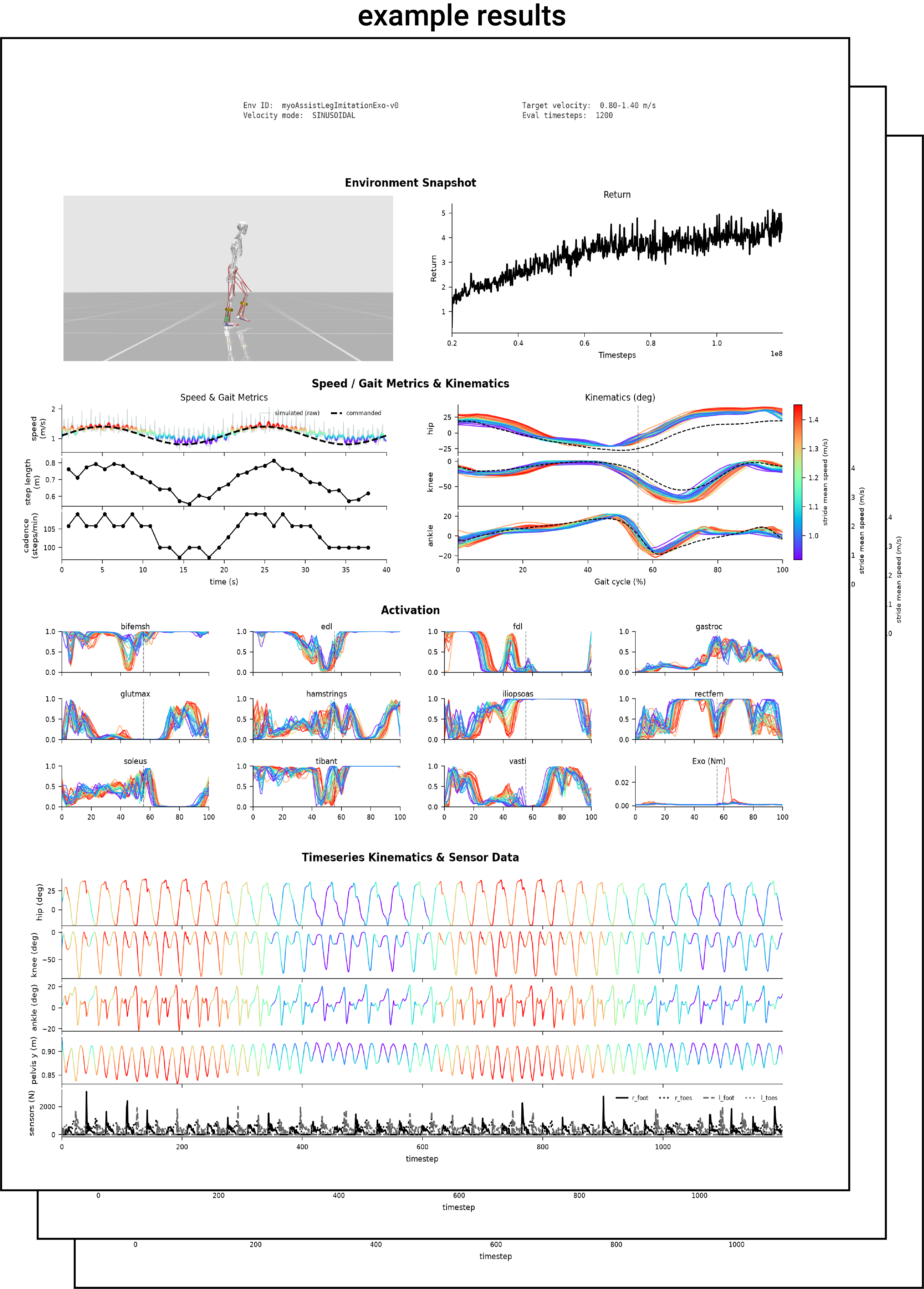
composite.png is a single summary figure with several panels that together characterize one rollout. Most panels are shared across both frameworks, and one panel is framework-specific. The example to the right is one such figure.
- Environment snapshot: a render of the model partway through the rollout.
- Optimization progress: the training return per update (RL), or the CMA-ES fitness per generation (CO).
- Speed and kinematics: commanded against achieved speed, gait metrics, and the hip, knee, and ankle angles across the gait cycle, drawn on a human gait reference.
- Activation: a grid of the muscle activations, with the exo torque.
- Timeseries: the joint angles, the pelvis height, and the foot-contact sensors over the full rollout.
The exact panels vary with the environment and the eval settings. MyoAssist defines the environment the same way everywhere: a {msk, device, terrain} env-spec of raw registry keys. See Defining an Environment.
Reinforcement Learning: run_policy_eval.py
Run run_policy_eval.py on a train_session_* directory from your training run:
python rl_train/run_policy_eval.py [path/to/train_session_folder]
It makes one analyze_results_NN/ folder for each entry in the evaluate_param_list. You set the evaluate_param_list in the session’s session_config.json. The tool writes the folders in the train_session directory:
rl_train/results/train_session_[date-time]/analyze_results_[NN]/
├── composite.png              # summary figure
├── composite.svg              # vector version
├── replay.mp4                 # rollout replay video
└── gait_evaluated_data.json   # rollout data in the GaitData schema
The evaluate_param_list sets which rollouts to evaluate. It sets the velocity mode, the timesteps, the camera, and other values. Refer to the RL Configuration page.
These flags change what run_policy_eval.py runs and writes:
| Flag | Meaning |
|---|---|
--legacy-plots | Also write the legacy per-panel PNGs. |
--no-show | Skip the pop-out composite window. |
--regen | Regenerate the evaluated gait data even if it already exists. |
--steps N | Override num_timesteps for every rollout. The configs ship 200, about 5 strides, which is too few for a per-phase quantity; use 1000 for about 30. |
--varying | Replace the list with one sinusoidal varying-speed rollout (0.8-1.4 m/s) and write the speed-tracking composite. |
--cmap {rainbow,teal,bluered} | Speed color map for the varying-speed composites. |
Exoskeleton policy scoring
Two tools in tools/ read the rollout JSON from an analyze_results_NN/ folder. They run no simulation of their own. Both compute every gait-cycle quantity in that leg’s own cycle.
score_exo_policy.py
Scores a trained exo policy on three axes and prints a ranked report. Use it to order runs that all walk, which the composite figure cannot separate.
- stability: cycle-to-cycle scatter, peak count, and slew of the torque profile.
- symmetry: left-right difference in peak magnitude and phase.
- plausibility: agreement with walking literature values. The ankle plantarflexion moment peaks near 50 % of the gait cycle, a powered ankle exo delivers a peak of 0.15-0.80 N*m/kg, and stance occupies about 60 % of the cycle.
Each subscore and their mean (total) run from 0 to 1.
python tools/score_exo_policy.py rl_train/results/train_session_*/analyze_results_00
| Flag | Meaning | Default |
|---|---|---|
--joint {ankle,hip} | joint the device assists | ankle |
--mass | body mass for N*m/kg normalization | 90.96 |
--json-out | also write every score to this JSON file | none |
--skip-unscorable | continue past rollouts with too few foot strikes to segment | off |
--by-name | order the report by directory name instead of by score | off |
Only the ankle path is validated against composed models. The hip window is provisional, so scoring a hip device prints a warning.
Two constraints on the ranking:
- Evaluate with enough steps. The configs ship
num_timesteps200, about 5 strides, which is too few for a per-phase quantity.score_exo_policy.pyhas no--stepsflag: it reads the rollout JSON thatrun_policy_eval.pyalready wrote. Generate a longer rollout first withrun_policy_eval.py --steps 1000, which gives about 30 strides. - Rank with this tool, not with the
train/mirror_lossmetric. A policy can lower that loss by driving both exo outputs toward zero.
plot_kinematics_exo.py
Writes one figure holding the hip, knee, and ankle angle of each leg against the mocap reference, with that leg’s exo torque underneath.
python tools/plot_kinematics_exo.py <run_dir> [<run_dir> ...] -o out.png
--reference sets the reference file, rl_train/reference_data/segmented.npz by default. --mass matches score_exo_policy.py.
Controller Optimization: run_eval.py
run_eval evaluates an optimized reflex controller. It reads a _Best.txt or _BestLast.txt parameter file from an optim_results folder. It then runs the controller in its composed environment and writes the shared outputs above. CtrlOptimGaitEvaluator does the rollout, with the config CtrlOptimEvalConfig. The follow camera comes from ctrl_optim/eval/camera_setup.py. The old Tkinter GUI eval is removed.
Run this command from the repository root:
# Use a JSON config
python -m ctrl_optim.run_eval --config ctrl_optim/eval/configs/example_config.json

# Or give a results directory. CLI flags set the other values.
python -m ctrl_optim.run_eval --results-dir ctrl_optim/results/preoptimized/exo_4param_125_0729_1339
If you give a results directory, run_eval finds the files in it. It finds the parameter file (*_Best.txt or *_BestLast.txt, from param_type) and the CMA-ES pickle (*_Pickle.pkl). A window shows the composite figure. To prevent this window, use --no-show.
JSON configuration
Copy ctrl_optim/eval/configs/example_config.json and give it a new name. Set your values in it. You can omit a field that has a default. The pipeline reads these keys:
| Key | Meaning | Default |
|---|---|---|
results_dir | folder with the optimized run | (required) |
param_type | "Best" or "BestLast"; which param file to load | "Best" |
param_file | explicit param .txt; found from param_type if null | auto |
pkl_file | explicit CMA-ES _Pickle.pkl; found if null | auto |
output_dir | where the pipeline writes outputs | <results_dir>/eval_output |
sim_time | rollout length (s) | 10.0 |
target_velocity | target walking speed (m/s), for readouts | 1.25 |
mode | "2D" or "3D" | "2D" |
init_pose | start keypose | "walk_left" |
delayed | biological neural delays | false |
exo_bool | exoskeleton on | true |
fixed_exo | hold exo params fixed | false |
use_4param_spline | 4-param or n-point exo spline | true |
max_torque | max exo torque. The shipped example_config.json sets 100.0, so a copy of the example uses 100.0, not this default. | 1.0 |
n_points | n-point spline points (when not 4-param) | 4 |
msk_key | human MSK registry key | "myolegs22" |
device_key | assist_sim device registry key | "Tutorial_L1" |
terrain | terrain spec (path or inline); sets the slope | flat if null |
camera_speed / camera_distance / camera_elevation / camera_height / camera_azimuth | follow-camera setup | see config |
render_width / render_height | render resolution | 1920 x 960 |
show_actuators | draw actuators in the render | true |
export_video | also write replay.mp4 | false |
video_fps | replay frame rate. run_eval.py does not read this key from the config, so it is effectively fixed at 100. | 100 |
The terrain sets the course grade. A slope terrain gives the incline. There is no separate slope flag.
CLI overrides
You can use flags instead of a config, or together with a config. A flag always replaces the JSON value.
python -m ctrl_optim.run_eval --results-dir <dir> \
    --param-type BestLast --sim-time 20 --target-velocity 1.25 \
    --mode 2D --exo-bool true --export-video --no-show
These flags are available: --config, --results-dir, --param-file, --pkl-file, --output-dir, --param-type {Best,BestLast}, --sim-time, --target-velocity, --mode {2D,3D}, --init-pose, --exo-bool, --export-video, --no-show.
Quick visualization
To make a quick video without the full analysis figure, use one of these scripts. For CO, use run_ctrl.py (refer to Running Reflex Control). For RL, use run_sim_minimal.py.