Terrains
Terrain is produced by myoassist.terrains and set through the terrain field of the environment spec. A terrain is either one uniform surface (a plane or a single heightfield) or a tiled grid of many terrain types.
This section covers both. Uniform Terrains is the single-surface family and its full schema; the rest of this page and Tile Types cover the tiled grid. For how to set terrain in a CO or RL run, see Defining an Environment.
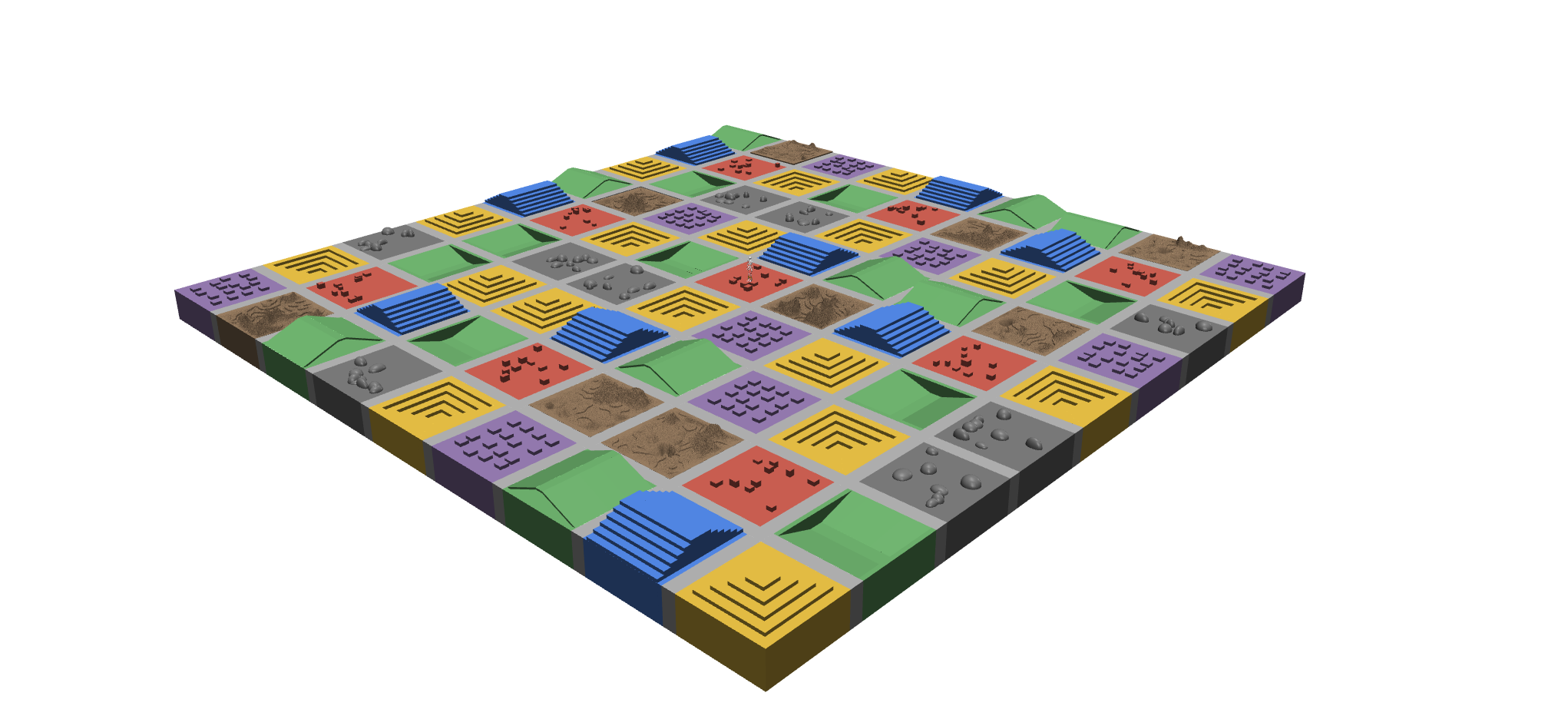
Grid
A terrain is a rows × cols grid of square or rectangular tiles with a configurable tile_size = (width_x, length_y). The grid is centered at the world origin. Cell (row=0, col=0) is at the most-negative (x, y) corner. Rows increase in +y, and columns increase in +x.
Tiles
Each cell holds one tile type from the registry. A tile module supplies its DEFAULT_PARAMS, its PARAM_RANGES, and an emit(...) function that adds geoms (and, for rough, a heightfield asset) to a MuJoCo MjSpec. See Tile Types for the full catalog.
Connectors
A flat connector strip of border.width meters separates the cells. Set the width to 0 to make tiles touch. Edge connectors and corner pieces are generated automatically. Their top face matches the neighboring tile heights through border.match_mode ("min", "max", or "mean"). Connectors run down to BASELINE_Z = -2.0, so a height difference reads as a clean step riser, not a floating shelf.
Boundary contract
Every tile presents a flat top at its declared base height around its whole perimeter (the flat-at-base contract). This lets connectors join cleanly, regardless of whatever happens in the middle of the tile.
gap is the one deliberate exception: its trench mouth reaches the tile edge, because falling in is what the tile is for.
The contract is measured rather than assumed. The framework ray-casts the compiled model at points around every tile, and around every inverted variant, so a tile that stops honoring it fails a test instead of quietly leaving a step against a connector.
Palette
There are three palette modes, set by palette_preset:
| Mode | Behavior |
|---|---|
diverse | Each tile type renders in its own default color. Easy to read while you tune a config. |
uniform | Every tile shares one color, set by palette: {"uniform": [r, g, b, a]}, plus an optional texture. Good for final renders. |
custom | Like diverse, but requires a palette entry for every placed tile type, so a final-render config checks itself instead of quietly falling back to defaults. |
In uniform mode you can bind a single 2D texture to the material through a texture block, for a concrete, asphalt, or dirt finish. A texture outside uniform mode is a config error rather than a silent no-op.
Randomization
The framework fills any cell that has no explicit tiles entry. It samples a tile type from randomization.weights, then draws that tile’s parameters from randomization.param_ranges[type] or from the tile’s built-in PARAM_RANGES. Explicit tiles and randomization can coexist. Explicit placements win, and the rest of the grid is sampled. See Configuration for the full schema.
Categorical parameters also randomize by default, even with no param_ranges entry. stairs and slope randomize axis and inverted, pyramid_stairs randomizes inverted, and gap randomizes axis. Set the parameter in param_ranges to fix it, or list its choices there to control the sampling.
Standalone CLI
The terrains package also ships a myoassist-terrains command for standalone use, outside a MyoAssist run:
myoassist-terrains build path/to/config.json [--activate]   # build a terrain XML
myoassist-terrains set-active <terrain_name>                 # switch the active terrain
myoassist-terrains list                                      # list the terrain library
myoassist-terrains preview <terrain_name>                    # preview one terrain
For the full CLI reference, see docs/cli.md in the myoassist.terrains repository.