Device Configuration
Every device has a YAML config under models/<DeviceDir>/ (for example L1config.yaml). The config tells assist_sim how to attach the device XML to a human MSK and how to edit the combined model. This page covers the common sections. For the full field-by-field reference and the deeper authoring notes, see the assist_sim config reference.
Top-level shape
device:                  # required: name, model_xml, optional compatible_msk
attachments:             # required: map device bodies to MSK parent bodies

# optional sections, each defaults to empty:
equality:                # constraints tying a device body to the MSK
joint_overrides:         # change range/damping of existing MSK joints
actuators:               # add joint-transmission actuators
keyframe_overrides:      # patch joint values in existing keyframes, by name
body_removals:           # delete biological subtrees (prosthetics)
mesh_replacements:       # swap a geom's mesh
geom_removals:           # remove named geoms
body_overrides:          # override a body's mass / inertia
actuator_overrides:      # set a re-anchored muscle's lengthrange
actuator_removals:       # remove named actuators
tendon_removals:         # remove named tendons
tendon_modifications:    # re-anchor muscle wraps onto residual bone (myodesis)
contact:                 # add contact pairs / excludes
sensors:                 # add sensors
sensor_removals:         # remove sensors
Only device and attachments are required.
device
device:
  name: "DephyExoBoot_L1"
  model_xml: "L1model.xml"
  # compatible_msk: ["myolegs22", "myolegs26"]   # optional; the shipped
  # DephyExoBoot omits this field, so it composes with every MSK model.
| Field | Required | Meaning |
|---|---|---|
name | yes | Namespace prefix added to every body, site, mesh, joint, actuator, and tendon imported from the device XML. Convention: PascalCase plus an _L1 suffix. |
model_xml | yes | Path to the device MuJoCo XML, relative to this YAML file. |
compatible_msk | no | Restrict which MSK models this device combines with. If absent, the device is compatible with all. |
attachments
attachments maps each top-level device body to a parent body in the MSK.
attachments:
  - device_body: "exo_1_r"
    parent_body: "tibia_r"
  - device_body: "fanny_pack"
    parent_body: "pelvis"
    pos: [0.0, 0.05, 0.0]      # optional frame offset
    quat: [1, 0, 0, 0]         # optional frame rotation
Each attachment re-parents the device body under the MSK body. Use pos and quat to adjust the frame per attach point.
Free-rooted devices. A device that is a separate mechanism strapped to the leg (for example a parallel linkage clamped at several points) attaches to parent_body: world instead. The device body keeps its own <freejoint>, and equality constraints then tie it to the leg.
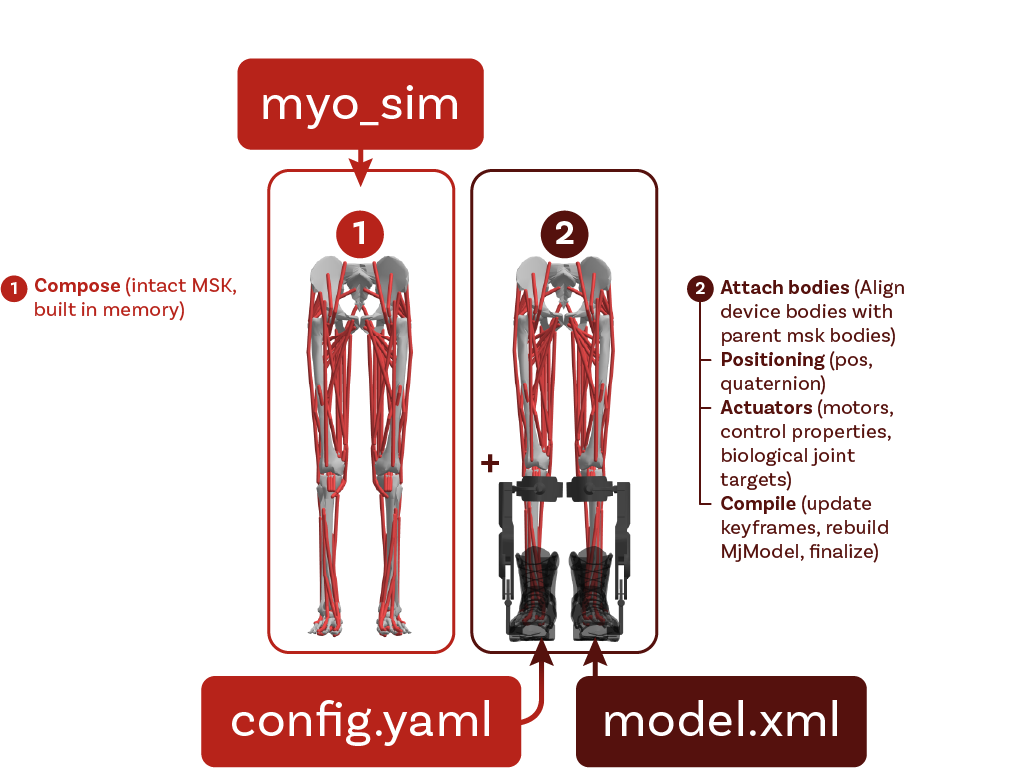
Optional sections
| Section | Purpose |
|---|---|
equality | Add MuJoCo constraints (connect, weld, or joint) that tie a device body to an MSK body. Used to fasten free-rooted devices and to close kinematic loops. |
joint_overrides | Change the range, damping, axis, or position of existing MSK joints. |
actuators | Add joint-transmission actuators to the combined model. Tendon-transmission actuators are authored in the device XML instead. |
keyframe_overrides | Patch joint values in the MSK’s existing keyframes. Refers to joints by name, so it is model-agnostic. |
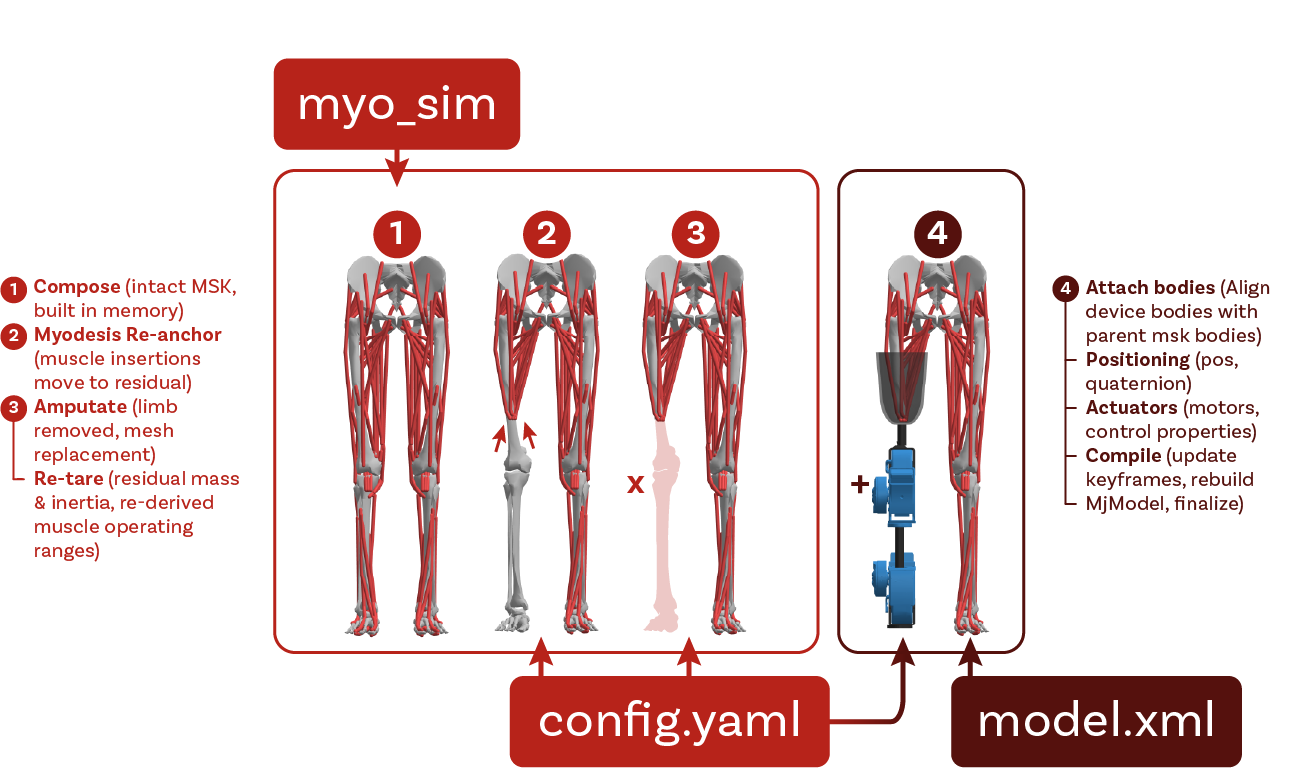
body_removals | Delete biological body subtrees before attaching the device (for example remove tibia_r and below for a transfemoral amputation). Re-anchor any kept muscle first with tendon_modifications. |
tendon_modifications | Re-anchor a kept muscle onto the bone that remains (the myodesis step): move its wrap sites and geoms onto the residual bone. This runs before the removals, or the cascade removes the muscle. |
actuator_overrides | Set a re-anchored muscle’s lengthrange. A re-anchor changes the muscle’s operating range. |
mesh_replacements / geom_removals | Swap a geom’s mesh for one from the device XML, or remove a named geom (for example the residual stump mesh). |
body_overrides | Override a body’s mass, its inertia (diaginertia, or fullinertia as the len-6 form), and its inertial frame (ipos, iquat). Used to reduce a residual limb after an amputation, so the stump does not carry the whole segment’s mass. |
actuator_removals / tendon_removals | Remove named actuators or tendons (for example muscles that cross an amputation level). |
contact | Add contact pairs and excludes to the combined model. |
sensors / sensor_removals | Add or remove sensors (for example restore a foot touch sensor onto a prosthetic sole). |
The sensors section is not limited to touch. It also supports the other MuJoCo sensor types, for example jointlimitfrc, framepos, and force. Each entry names one target with the matching key (site, joint, actuator, tendon, body, or geom). The assist_sim config reference lists every type and the target each one needs.
Prosthetic amputation workflow
A prosthetic device removes distal anatomy and keeps the muscles that remain. The order matters:
tendon_modifications: re-anchor each kept muscle’s wraps onto the residual bone.body_removals: remove the distal bones. The cascade removes any muscle still anchored past the cut.actuator_overrides: give each re-anchored muscle a newlengthrange.mesh_replacementsandbody_overrides: swap in the residual stump mesh and reduce its mass.
Per-MSK overrides
One config can carry per-MSK variations. A section holds a default entry plus per-MSK-key entries, and the resolver picks the matching MSK key if present:
attachments:
  default:
    - device_body: "hmedi_torso"
      parent_body: "torso"
  myolegs:
    - device_body: "hmedi_torso"
      parent_body: "pelvis"
      pos: [-0.105, 0.08, 0]
Every section except actuators and the legacy keyframes supports this form. The assist_sim config reference gives the full field detail and authoring rules for each section.
Upper-body & Seated-mobility environments
The upper-body and seated-mobility environments are the non-gait members of the device set. See the three cards at the bottom of the Device Catalog.
These environments differ from the gait-assistive devices. They are not registry devices, and are less modular. A dedicated builder function in assist_sim.upper_body makes each one. You do not use load_combined. The MPL is the prosthetic device, not a host model. The standalone MPL environment loads it on its own, with no myo_sim human. In the bionic-bimanual task, the MPL device mounts on a MyoArm host. The Wheelchair environment composes a MyoArm on a rigid or muscle-driven MyoTorso. build_wheelchair uses bimanual arms (both) by default, and also accepts left or right.
| Gait-assistive devices | Upper-body & seated-mobility | |
|---|---|---|
| Shape | Modular MSK × device composition | Single composed model per environment |
| Entry point | load_combined("<msk>", "<device>") | build_<env>(...) in assist_sim.upper_body |
| Discovery | Found in the registry; list shows them | Not registry devices; list does not show them |
| MSK choice | Any compatible registry MSK model | The builder composes the human, if there is one |
| Configuration | Device YAML plus per-MSK overrides | Builder keyword arguments (for example arms=, torso=) |
| Output | (MjModel, MjData) | (MjModel, MjData) |
The build API
Each environment has a builder in assist_sim.upper_body. The builder returns a compiled model and a new MjData:
from assist_sim.upper_body import (
    build_wheelchair,
    build_mpl,
    build_auxivo_liftsuit,
    build_bionic_bimanual,
)

model, data = build_wheelchair(arms="both", torso="passive")  # "both"|"right"|"left"; "passive"|"muscled"
model, data = build_mpl()               # standalone bimanual MPL robot (no myo_sim human)
model, data = build_auxivo_liftsuit()   # passive back-exosuit on the muscled myotorso
model, data = build_bionic_bimanual()   # biological arm + MPL prosthesis manipulation task
Every builder returns (mujoco.MjModel, mujoco.MjData). This is a standard compiled MuJoCo model with data at qpos0. You can step it or render it at once.
The three composed environments also give a build_*_spec(...) companion: build_wheelchair_spec, build_auxivo_liftsuit_spec, and build_bionic_bimanual_spec. The companion returns the uncompiled MjSpec. Use it to compose more elements, or to export the environment (see Exporting & Loading Models). build_mpl has no spec companion, because assist_sim loads the MPL directly from its XML file.
Common properties
The three composed environments (Wheelchair, AuxivoLiftsuit, bionic-bimanual) share the same conventions. MPL is the exception, as it is a self-contained environment with no myo_sim msk, and assist_sim loads it directly.
- The human comes from
myo_sim.assist_simcomposes the anatomical body frommyo_simat build time. It does not hold the anatomical meshes. - Device hardware meshes only. The hardware meshes for each environment (chair frame, exosuit shell, prosthetic parts, task object) are in
models/<Name>/. MPL is a robot, so it holds its full mesh set. - Rigid parts have no joints. Some parts do not need a degree of freedom, such as the seated legs of the Wheelchair. The builder writes the pose into the body geometry and removes the joints.
- Transcribed keyframes. If the original environment supplied keyframes, the builder maps them by joint name onto this build. The Wheelchair has two propulsion poses. bionic-bimanual has four task poses. MPL and AuxivoLiftsuit have none.
- Model-only output. The composed model holds the human and the device. A downstream step adds the scene and the terrain, the same as for the gait-assistive devices. MPL is the exception, because it carries its own basic scene.
The environments
AuxivoLiftsuit
A passive back-exosuit in the style of the Auxivo Liftsuit. The human wears it over the muscled myotorso, which has spine joints and trunk muscles. build_auxivo_liftsuit() attaches the exosuit hardware to the torso, then couples it with two body welds and four spring tendons. This environment supplies no keyframes.
from assist_sim.upper_body import build_auxivo_liftsuit

model, data = build_auxivo_liftsuit()
Wheelchair
A seated human who propels a manual wheelchair. build_wheelchair(arms="both", torso="passive") composes the selected arms on the selected torso, sets the legs to a rigid seated pose, and fixes the chair hardware to the torso.
from assist_sim.upper_body import build_wheelchair

model, data = build_wheelchair(arms="both", torso="passive")
arms:"both"(mirrored bimanual),"right", or"left". The original model has a single right arm, which isarms="right".torso:"passive"or"muscled". The default is"passive", a locked scaffold with no muscles."muscled"is the activemyotorsowith spine joints and trunk muscles.- The legs are rigid and have no joints. Only the arms articulate.
- The keyframes
start_returnandpushingdrive the propulsion cycle.
MPL
The Modular Prosthetic Limb (JHU/APL) is a self-contained robotic bimanual arm and hand model. It has its own meshes and actuators, and it has no myo_sim human. It comes as the bimanual “SALLY” configuration: a torso with two MPL arms and simplified hands. build_mpl() loads it directly and does not compose it. MPL carries its own basic scene (floor, skybox, lights) and supplies no keyframes.
from assist_sim.upper_body import build_mpl

model, data = build_mpl()
bionic-bimanual
The “bionic bimanual” manipulation task. A biological right arm faces an MPL left prosthetic arm. Between them is a YCB gelatin box on a start pillar, and the task moves it to a goal pillar. build_bionic_bimanual() composes the human as a passive torso with a right arm, then attaches the prosthesis, the object, the pillars, and the base pedestal. It supplies four task keyframes.
from assist_sim.upper_body import build_bionic_bimanual

model, data = build_bionic_bimanual()
Exporting
To write a composed environment to a standalone XML file, pass the output of the build_*_spec(...) companion to export_upper_body_xml. See Exporting & Loading Models for the full procedure. build_mpl has no export path, because the MPL is already a standalone XML file on disk.